EXPENSE MANAGEMENT Software
Easily manage reimbursements with automated decisions based on your org’s rules
Award-winning HR and payroll innovation



Full-solution automation
One software to end manual reimbursement

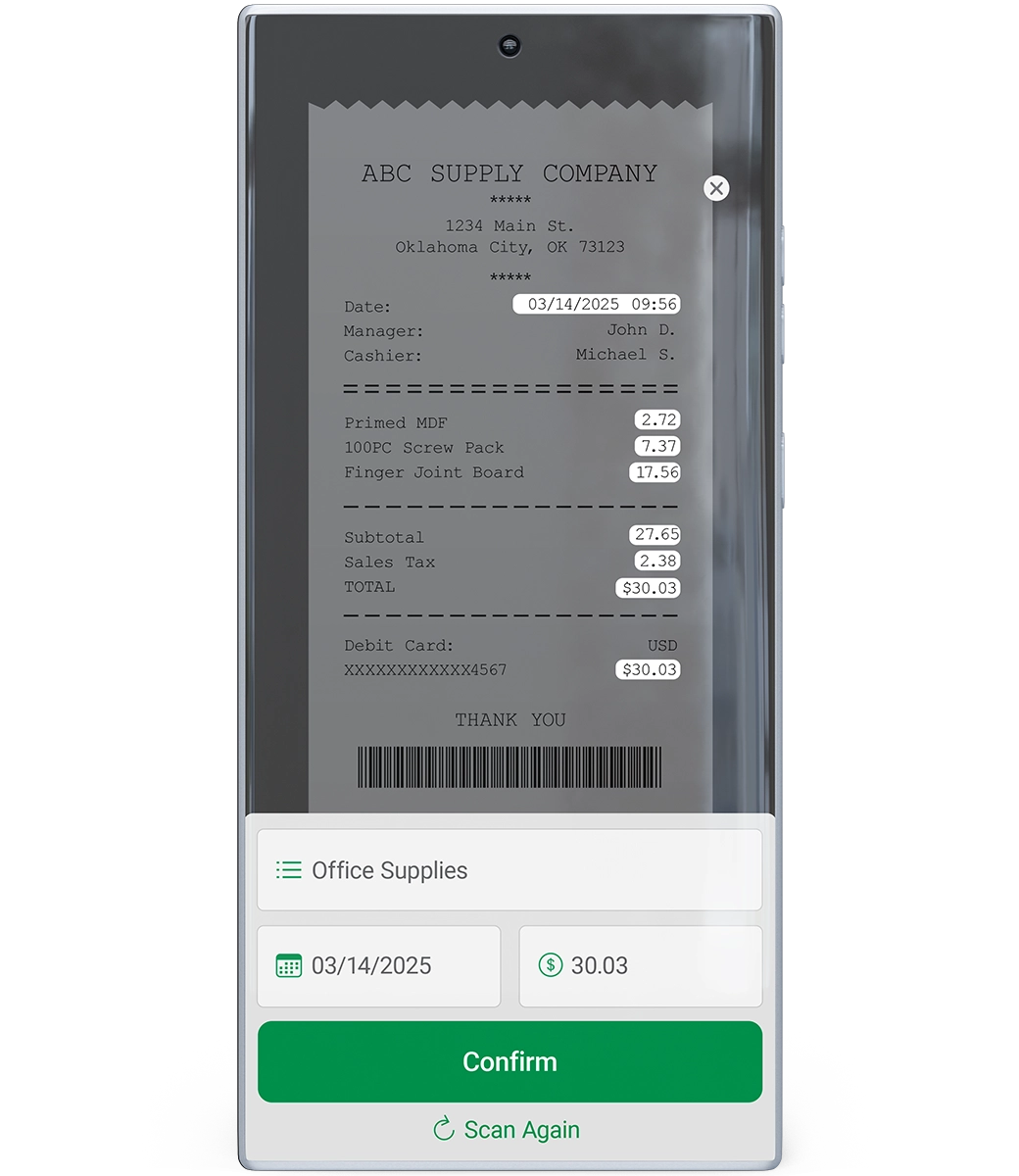
Even if you have a system to help handle expenses, that doesn’t mean it lightens your workload. Because our Expense Management software exists in a truly single database, it automatically connects with our other tools. After an employee uploads or snaps a photo of a receipt, Paycom autopopulates the necessary fields. From there, our tech notifies managers or auto-approves expenses based on criteria you set — no need to separate them into high-level categories.
Expense Management automatically:
- alerts employees about expense decisions
- approves submissions based on criteria your org sets
- allocates expenses from your general ledger
- matches stored receipts to your corporate card
- calculates traveling rates (with our FAVR and Mileage Tracker tools)
- feeds approved expenses into payroll

Seamless workflows
Effortlessly create and manage expense properties, policies and approval workflows to free you from time-consuming tasks.

Big-picture reporting
Streamline expense reporting with automated reports and the payroll dashboard, so you can stop being a middleman and focus on strategy.

Self-service submissions
Our software makes it easy for employees to enter receipts and warns them of duplicate entries, so your company doesn’t accidentally overpay.

Manager insight
From viewing and approving requests to flagging redundant receipts, our tech lets your leaders manage expenses right from the Paycom app.

True transparency
Using Employee Self-Service®, your employees can check the status of their pending reimbursements without pulling away from work.

Defeat decision fatigue
Why spend time and effort approving expenses you don’t need to think about? Our software can approve submissions based on your company’s established policies.
HOW EXPENSE MANAGEMENT WORKS
Simplify expenses for everyone
Processing expenses can create unnecessary manual work and increase the risk of errors. But in our truly single software, our Expense Management tool ensures a seamless and automated experience for everyone involved to protect your workforce data integrity and your peace of mind. Here’s how.
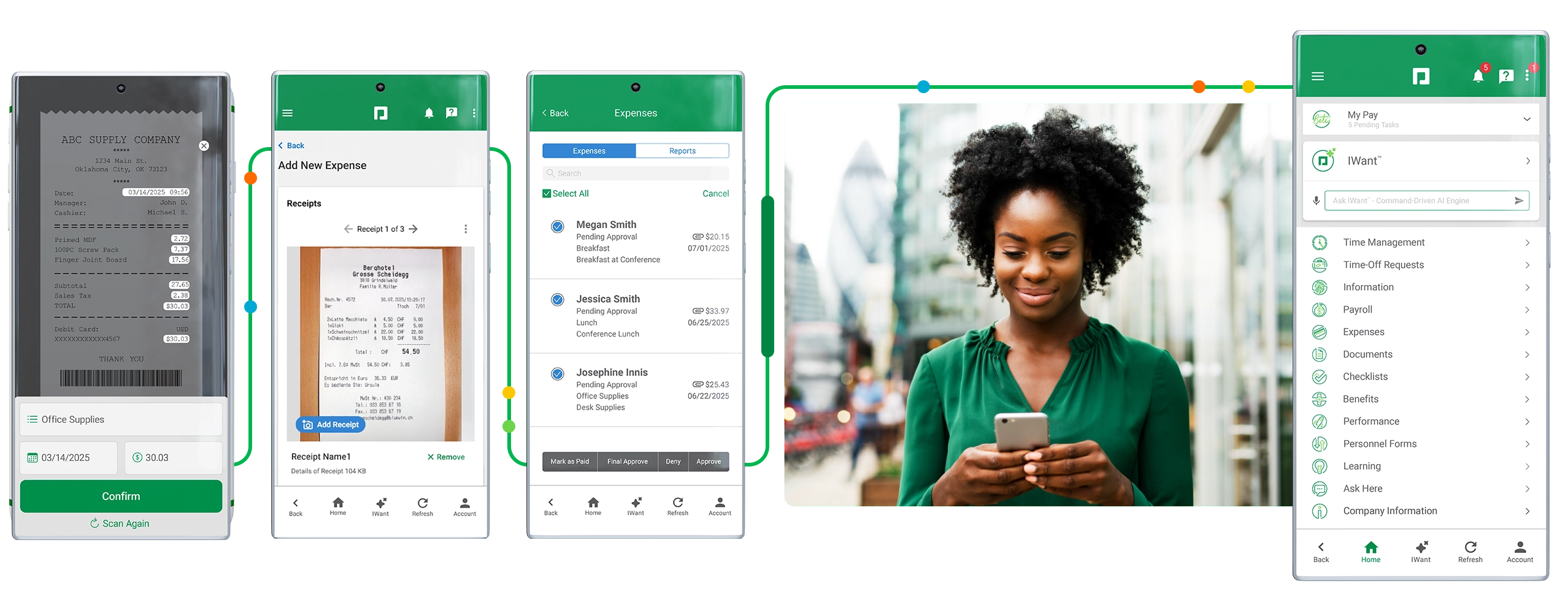
Step 1:
Simplified submission
Employees just snap a photo of their receipt and upload it through Paycom’s intuitive mobile app. No need to break down line items — or break out a scanner.
Step 2:
Automated image parsing
Our software automatically parses the employee’s submitted image to fill in applicable fields, allowing them to easily submit the request within our guided experience.
Step 3:
Instant approval notifications
The employee’s manager gets an automated alert of the pending expense, making it easy for them to review, approve or deny the request. And if the expense meets the criteria you set, it can be auto-approved.
Step 4:
Autopopulating payroll
Once approved, the expense seamlessly flows into payroll to appear on the employee’s upcoming check. The employee is then automatically guided to review and verify the change to their pay before payroll submission.
See what people are saying about expense management
Frequently asked questions
Learn more about expense reimbursement
Employee expense tracking software simplifies the process of submitting receipts and mileage to later be reimbursed through payroll. Paycom’s Expense Management tool, for example, makes it easy for employees to upload their expenses and automates tedious aspects of the process for HR. By doing so, this tech eliminates manual data reentry and prevents errors, like paying out the same receipt twice.
Paycom’s Expense Management tool simplifies expense approval and management for everyone involved. First, it allows employees to scan and upload receipts right from their phone. It even autopopulates relevant fields from just a picture and warns them if the expense is a possible duplicate entry.
From there, expenses automatically flow to managers for approval from anywhere. Or, even better, with your organization’s expense policy set up in our software, submissions are automatically approved based on those rules. That approved data then flows seamlessly into payroll, allowing HR to track any pending reimbursements through an intuitive dashboard. Our Expense Management tech also gives HR and payroll pros insight into outstanding approvals, so they can address any bottlenecks quickly and without needlessly chasing down leaders.
Yes, Paycom allows you to set your own approval chains for expense requests. After you enter the relevant assignments, submitted receipts and mileage will automatically and securely flow to only those who need to review them.
For an even quicker process, simply configure our Expense Management tool to house your organization’s expense policy so submissions that meet your criteria are automatically approved.
Our Expense Management software automatically warns employees if the receipt they’re attempting to submit is a possible duplicate. Should they proceed with submitting it, Paycom flags the entry for their managers. Finally, Expense Management allows you to easily produce reports and filter them based on possible duplicate entries, giving you yet another line of defense against overpayment.
Since our employee expense tracking software exists in the same single software as all of Paycom’s tools, approved reimbursements flow seamlessly into payroll. No need to hop to another system with separate login info. Once expenses are approved, whether by designated assignees or by our automated software strictly adhering to your established policies, that’s it. HR can simply monitor them for accuracy.
Yes. With Paycom, approved expenses seamlessly flow into payroll. This allows employees to easily view upcoming reimbursements and lets HR monitor the process from a high level, freeing you from unnecessary manual tasks.
Yes! With our optional Mileage Tracker tool, you can automatically track your employees’ business miles. Take this a step further with FAVR, an optional tool that autocalculates rates based on a precise location using the national per-mile average, which is determined by the IRS.
Yes, your people can use our self-service app to easily submit expenses. They can even just snap a photo of a receipt, and our AI-assisted tech will autopopulate any relevant fields. It’s that easy.
Absolutely! Our Expense Management tool offers the ability to link stored receipts to assigned corporate credit card numbers by employee. This means you no longer have to chase workers down for clarity you should’ve already had.
Expense Management allows employees to submit expense reports, upload or snap a photo of receipts, track mileage and monitor the status of their pending expenses. The tech allows managers to review, approve or deny expense reports, ensuring compliance with company policies. Meanwhile, HR and payroll staff can establish expense policies, create approval workflows and generate reports for strategic analysis.
Best of all, this functionality exists within Paycom’s single software, streamlining the entire expense management process, reducing errors and improving efficiency overall.
Ready to see Paycom in action?
Our representatives are here to help! Request a meeting for personalized guidance based on your company’s unique requirements.
Request a meeting
* indicates a required field
User Info
Contact Info
Company Info

By submitting this form, you accept our Terms of Use and Privacy Policy.